A WAIFUSTUFF ORIGINAL

PC + ANDROID · ALPHA

DATING SIM · COMPANION FOR PC & ANDROID · VIDEO PLAYER · ARCADE

YOUR WORDS.
YOUR STORY.

A dating sim with characters who have minds of their own. Your AI companion on desktop and now on Android. Plus video player and arcade: discover the many sides of Waifu Kombat.

NEW / ANDROID COMPANIONYour desktop AI, on the go

MEET THE ROSTER

EVERY FIGHTER.
HER OWN STYLE.

Eight personalities. Countless possibilities.
Find your companion in Ravenbay — or create your own.

YOUR COMPANION. YOUR IMAGINATION.

The originals are
just the beginning.

Your companion can be your own creation. You decide who you meet.

Custom characters

Choose a name, image, personality and backstory. Create a companion who fits your story.

Your character. Your voice.

As little as 5–10 seconds of clear speech can provide a reference for voice cloning. Compatible voice models also support emotion and different tones of voice.

Bring them to life.

PLANNED

A MiniMax animation workflow is planned to bring your own images to life with gestures and animations.

Your look. Your voice. Your personality. Let your imagination run free.

01 / STORY MODE

WELCOME TO
RAVENBAY.

A city full of encounters. Characters with stories of their own. And you, right in the middle.

RAVENBAY / YOUR WORLD
Ravenbay by day: coastal castle, woodland, city and harbour
RAVENBAY BY DAY
01

Follow your curiosity.

Meet new characters, discover places and experience story events. Your choices become part of your shared story.

02

Encounters connect.

Friendships, rivalries and personal preferences shape each character. Trust, dates and group conversations reveal new sides to them.

03

Your next chapter.

Day and night, dates and messages accompany your journey. Save your progress and continue your story later.

Story mode is already playable. More events and a connected storyline will expand Ravenbay during the alpha.

02 / AI WITH CONTEXT

ONE CONVERSATION.
A WHOLE WORLD BEHIND IT.

Waifu Kombat brings together memories, personalities and the current situation. Story mode adds trust, relationships and what is happening around you. Every reply has a context.

Over coffee, Seraphine notices Roxanne and the grey player silhouette at another café table
Illustration · Awareness in story mode

PRESENCE & RELATIONSHIPS

Your meeting does not go unnoticed.

While you talk to Roxanne at the café, Seraphine notices your meeting. Your relationships and her personality influence what she thinks of it.

She sees you together. Your private words stay between you.

What connects your encounters.

Discover what happens behind the conversation.

01Memories
AI CHAT & STORY

What matters to you can stay.

Preferences, agreements and shared experiences can be recalled later. Review, correct and pin important memories. Independent scenarios keep their own memories.

02Trust & relationships
STORY MODE

Connection grows through encounters.

The game keeps track of trust and your relationship status. Time spent together and the way you treat each other shape how your relationship develops.

03Location awareness
AI CHAT & STORY

She knows where you are.

Your character knows the current setting and its surroundings. She can suggest a suitable change of location. You have a say in whether you move on together.

04Awareness
STORY MODE

Others can notice you.

The game considers who is actually present. Characters can notice your meeting and react to it. The contents of private conversations are not automatically shared.

05Personality
AI CHAT & STORY

A mind of her own.

Backgrounds, preferences and connections to other characters shape their reactions. They can agree, make suggestions of their own and say no.

06Time & events
STORY MODE

An evening can take a new turn.

Closing time, ongoing dates and story events give conversations new directions. A farewell or a shared departure becomes part of your saved progress.

STORY / HER OWN CHOICES

You both decide what happens next.

The café is closing. Would you like to spend more of the evening together? Her personality, your trust and how the conversation went influence her decision.

She can come with you, suggest something else or say no and say goodbye.

Continue togetherAnother suggestionA goodbye
Roxanne in her cream casual sweater beside the grey player silhouette under an umbrella outside the café
Illustration · One possible continuation of your date

YOUR PERSONAL AI CHAT

How will your story begin?

Choose free chat, a prepared scenario or a starting point of your own. Custom characters and personas, image conversations with a compatible model, speech and expandable style packs make your encounters personal.

Custom scenariosShare imagesVoices & gesturesStyles & outfitsLocal model or API

03 / WAIFU KOMBAT DESKTOP COMPANION

YOUR DESKTOP.
HER PERSONALITY.

WKDC

Your favourite character stays with you beyond the game. An independent desktop companion, with animations, conversations and her familiar voice.

WKDC · WINDOWS DESKTOPACTUAL APPLICATION VIEW

SERAPHINE DUSK · DESKTOP COMPANION

Your game character.
Part of your everyday life.

Right at the edge of your desktop. A conversation is just one click away.

Chat & Stop beside your character
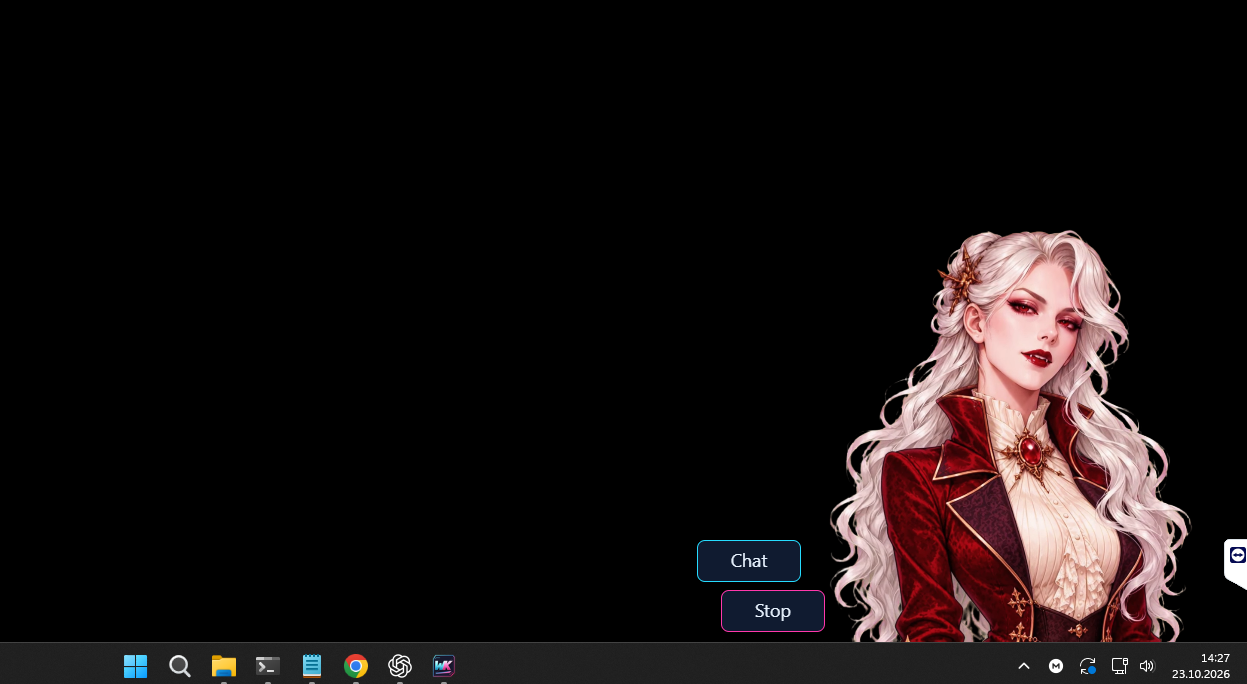
Screenshot of Waifu Kombat Desktop Companion: Seraphine at the bottom right above the Windows taskbar, with Chat and Stop buttons to her left
Development screenshot · Seraphine on the Windows desktop

The game can stay closed.

Import your character’s available animations, styles and reference voice from Waifu Kombat once. WKDC then runs as its own Windows application, with separate settings and conversations.

01 / CHARACTER

More than a still desktop picture.

Idle animations, gestures and reactions bring your character to your desktop. Choose from your character’s imported styles and animations.

02 / AWARENESS

She notices what you choose to share.

Active applications, selected folders or approved webpages can become conversation topics. Connect browser content through the extension. You choose the sources and can pause observation.

03 / CONVERSATIONS

You do not always have to start.

Send a message through the small chat bubble beside your character. If you choose, she can also start with a comment of her own. You decide whether and how often in the settings.

04 / VOICE

The voice you know.

Replies can be spoken, too. The imported reference voice from Waifu Kombat gives your companion her familiar voice, with optional local speech through Breeze.

05 / MEMORIES

Your conversations carry on.

Each character has a separate conversation history and memories in the companion. Add your profile, save what matters, and edit or delete memories when things change.

06 / DEVICES

Feel the connection, if you choose.

WKDC can control compatible Lovense devices and other supported devices through Intiface Central. You explicitly enable control and choose patterns, intensity limits and duration. Stop stays within reach.

NEW / GROUP CHAT IN THE DESKTOP COMPANION

Join in whenever you like.

Viora and Kira can keep talking to each other even when you don’t say a word. With voice enabled, you can sit back and listen, then jump in whenever you like.

Viora & KiraWho gets the button?
Animated example scene
Empress VioraRAVENBAY · VAMPIRE EMPRESS

Kira MarozRAVENBAY · COMMANDER

Read the example dialogue below the preview.

Read the full dialogue
  1. Viora

    Kira, ask our guest why my letter was opened.

  2. Kira

    You were told to deliver it. Who gave you permission to break the seal?

  3. You

    I thought it was decorative.

  4. Viora

    How careless. Kira. Once.

  5. Device

    Kira triggers a short pulse. You stay quiet.

  6. Kira

    May I keep the controls for the next question, Your Majesty?

  7. Viora

    You seem rather keen, Commander.

  8. Kira

    I only meant to show you I can get a better answer without them.

  9. Viora

    Excellent. Hand them back, then.

  10. You

    Hey, hey. Don’t I get a vote on who gets to torture me?

  11. Viora

    You may make a recommendation.

  12. Kira

    Shall I file it under ‘Suggestions,’ Your Majesty?

YOU DECIDE HOW CLOSE SHE GETS.

Observation, voice and device control are optional.

You decide which observations are shared with your chosen AI server. Your companion can chat without access to every website or a connected device.

WKDC & Waifu Kombat on Patreon

INDEPENDENT WINDOWS COMPANION · IN DEVELOPMENTCharacter import from Waifu Kombat · Configured AI server required · Optional speech with Breeze

COMPANION / NOW ON ANDROID

ANDROID APP · ALPHA

YOUR AI.
NOW ON THE GO.

Your PC stays home.
Your companion comes along.

Take your own desktop language model with you on your Android phone. Chat with your companion, hear their voice and give them a task, over Wi-Fi or mobile data.

YOUR DESKTOP AI
The AI runs on your PC. Your phone is your way in when you are out.
YOUR VOICE
With text-to-speech set up on your PC, listen to replies in the app and play them again.
YOUR CHARACTER
Personality, images, animations and tasks make your companion your own.

Who will come along? Seraphine, Aiko or a character you create, such as Android 18 in a custom role. You choose their personality and task.

YOUR COMPANION. YOUR TASK.

Training partnerLanguage partnerPlayful companion
Seraphine Dusk · Original Android app screenshotAnimation videos only load when you open the mobile preview.

AS PERSONAL AS YOUR DESKTOP

Your character.
Your way to chat.

  • Download character images and available animations from your PC.
  • Create tasks for each character and edit them on the go.
  • Customise the background, chat bubbles and transparency.
  • Adjust character size and position, and choose your preferred reply length.
  • Optional parallax effect: the background responds gently as you move your phone.

FROM DESKTOP TO PHONE

Pair once.
Then take them along.

  1. 01
    Get your PC ready

    Start the launcher and text AI. Turn on voice if you want it.

  2. 02
    Pair your phone

    Open the Android app and scan the QR code in the launcher.

  3. 03
    Choose your companion

    Load your character and media, set a task and start chatting.

For new AI replies and new speech, keep your Windows PC, launcher and required AI services running and online. Set up the launcher’s mobile connection for access on the go. Voice is optional; device features depend on compatible hardware and connections.

04 / CONNECTED EXPERIENCE

CONVERSATIONS
YOU CAN FEEL.

Personal AI chat, connected devices and local videos without a funscript. Discover another side of Waifu Kombat.

PERSONAL AI CHAT

A conversation
you can feel.

With your permission, the AI can control your connected device in tune with the dialogue. You set your limits and can stop control at any time, adding another form of interaction to your conversation.

Connect Lovense and other supported devices through compatible integrations such as Xtoys. Without a connected device, simply enjoy your personal conversation.
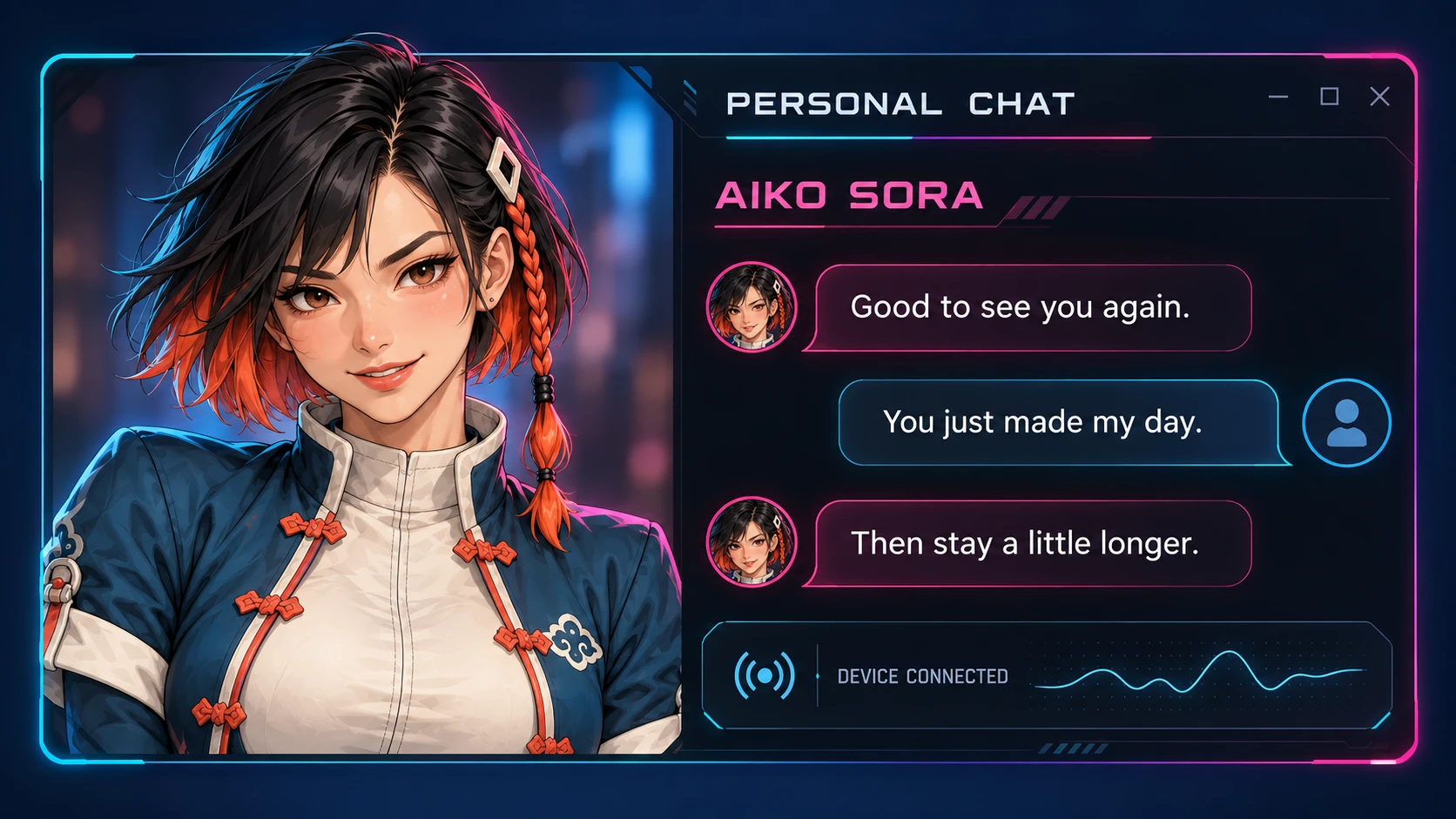
Illustration of a personal AI chat window with Aiko Sora, messages and a device connection
PERSONAL CHAT / AIKO SORAIllustration · Concept view
VIDEO PLAYER / MOTION SCAN

Local videos.
No funscript needed.

For any video you can play locally in the player. No pre-made funscript file required.

Open your video in Waifu Kombat’s integrated player. Our system scans the video for motion and uses the results to create movement patterns that control your connected, supported device.

There is no need to download or create a funscript yourself. Motion analysis takes care of that step.

  1. 01Open a video

    Choose a local video file.

  2. 02Scan for motion

    The system analyses motion in the video.

  3. 03Your device responds

    Detected motion patterns become device commands.

NO FUNSCRIPT NEEDEDAUTOMATIC MOTION ANALYSISLOCAL VIDEOS

06 / ARCADE MODE

YOUR RHYTHM.
YOUR CHALLENGE.

IN DEVELOPMENT · PC

THERE IS ALWAYS TIME FOR A ROUND.

No AI or chat required.

Choose your opponent, react to challenges and train your endurance. Arcade brings its own mechanics, rhythm and variety, without needing a loaded AI model.

ARCADEQTE & COMBOSDIALOGUE CLASH
Meet the fightersExplore AI chat & the video player

Aiko’s underground arena with a boxing ring and neon lighting
STAGE 01

THE UNDERGROUND

Aiko Sora’s home turf.

Your opponent sets the pace.

Arcade mode puts the match at the heart of the experience. Choose your persona and opponent, or leave your next encounter to chance.

PERSONAS · OPPONENT SELECTION · MATCH HISTORY

BEHIND THE SCENES

FROM CONCEPT
TO THE ARENA.

A character is more than a picture. Personality, voice and the right arena turn a design into an opponent you remember.

Character design, original backgrounds and game development come together here. Step by step, the Waifu Kombat universe grows.

STUDIO JOURNAL

A CLOSER LOOK AT
WAIFU KOMBAT.

UNDER THE HOOD / OUR LOCAL AI

SMALL ENGINE.
BIG AMBITIONS.

Qwen 9B as the engine. Thinking, lore, memory and rulebooks as the tuning.

In our analogy, a model with 700 billion parameters is a ten-litre V12: enormous reserves from sheer size. Our goal is a strong experience on your own PC, without planning for a €40,000 computer.

To us, our local approach feels like a 1.2-litre four-cylinder with 400 horsepower: a small engine whose whole setup receives careful attention. We tune the model, the information in its context and the game systems to work together.

WAIFUSTUFF / LOCAL AIQWEN 3.5 FAMILY
9B

OUR LOCAL ENGINE

THINKINGLOREMEMORYRULEBOOKS
4 cylinders. 1.2 litres. A lot of fine-tuning.
The engine comparison is a metaphor for our approach, not a measured performance comparison with a 700B model.

NEW / THINKING IN THE DESKTOP COMPANION

Plan first. Then reply.

If you choose, Qwen gets a bounded private planning phase before its visible reply. This gives it extra room to connect personality, task and context. You can turn planning on or off for subsequent replies.

256512102420484096
Five slider steps, a separate reply budget and visible timings. Choose the balance of extra planning and waiting time that suits your PC.

NEW / DIRECTOR IN THE DESKTOP COMPANION

A co-driver for the conversation.

Thinking helps Qwen prepare the next reply. The Director keeps track of the route. It periodically sums up what has happened and gives the characters a direction for the scene ahead.

Watch the group chat preview
Free conversation
Let the conversation unfold in its own way.
Conversation with a goal
Give the scene a goal to work toward.

For solo and group chat. Choose how often the Director checks in or pause it during a scene.

32 ways to tune. One shared goal.

Here is the work behind it: each component, what it does and how it helps your conversation.

01Model, memory & tuningThe right engine for your PC.
Selected Qwen 9B profiles
We maintain specific model variants with matching settings, rather than choosing by parameter count alone.
A useful starting point for local character conversations.
GGUF quantisation & VRAM planning
Compact model variants and the setup assistant account for available GPU memory and the extra memory needed by voice.
More choice across PCs, with a visible trade-off between memory use and model quality.
The right chat template
Each supported model variant gets its intended conversation format and role markers.
Instructions, user text and replies arrive in the format the model expects.
Tuned sampling
Model profiles control temperature, top-p, top-k, repetition settings, sampler order and seed.
Creativity, repetition and comparability can be tuned deliberately.
Context & reply budgets
We limit additional context and manage input and reply lengths for the selected configuration.
Less unnecessary material in the model’s limited working context.
Central launcher handoff
The loaded model profile and configured text and voice services are passed to connected applications.
Less repeated setup and fewer conflicting base settings.
02Prompts that stay on taskClear identity and the instructions needed right now.
Clear speakers & roles
Active character and player names are explicitly bound, with separate roles for the character and user.
Less room for mixing up names, perspectives or responsibilities.
Personality, profile & task
Character description, user profile and active task are kept as distinct information. Custom descriptions can be more detailed.
The character gets a clear identity and a specific task.
Compact scene context
The current location, starting situation and important room facts are supplied for the conversation.
Replies can refer to the scene that is actually taking place.
Instructions on demand
Voice, device and other function instructions depend on what is enabled and currently available.
The small model has fewer irrelevant side tasks to process at once.
Fewer repeated instructions
Known repeated standard instructions and identical descriptions are consolidated or omitted from the outgoing context.
More attention for the current message and character.
Short decision fields
Clear yes/no fields and concrete function examples replace unnecessarily complicated decision instructions.
Simpler requirements are easier for small models to fill in consistently.
03Lore: knowledge for the current questionRetrieve, combine and rank again.
Shared lore library
Built-in lore and enabled custom books are available through shared search. Supported SillyTavern JSON formats can be imported.
World and character knowledge can be added without training a new language model.
BM25 lexical search
Lexical search finds matching terms, names and phrases in available sources.
Specific facts remain retrievable without an enabled semantic search service.
BGE-M3 semantic search
The optional local embedding service also searches for meaning shared by a question and knowledge passages.
Relevant information can be found even when the wording differs.
Hybrid result fusion with RRF
Lexical matches and semantic candidates are combined into a shared ranking.
The strengths of both search methods can contribute to selection.
Reranking before the reply
A local cross-encoder scores retrieved candidates against the current request and ranks them again.
The language model gets a more focused selection instead of an unsorted result list.
Character filters & knowledge access
Books can be assigned to characters and contexts. Existing story access rules and knowledge boundaries remain part of selection.
Knowledge can be directed to the right character and game context.
Small, bounded knowledge excerpts
Additional knowledge has its own budget; selected passages and already included identical sources are kept bounded.
More space for useful passages within the available context.
CPU search & reusable indexes
Search services run locally on the CPU. Prepared books and search indexes are reused through a shared cache.
Knowledge retrieval does not need another large language model on the GPU.
04Long conversations & guided scenariosMemory and rules give a conversation direction.
Original messages as the foundation
Conversations are stored with speaker, time and source, and made searchable for permitted later retrieval.
Important earlier statements can be recalled in their original form.
Recent context plus targeted recall
A bounded window of recent conversation turns is supplemented with a few relevant older original passages.
Long conversations do not need to be transmitted in full for every reply.
Separate conversation worlds
Characters, player personas and independent scenarios retain their own boundaries for memory retrieval.
Less mixing of different people and different stories.
Source-linked diary
Supported channels offer a short diary with linked sources. Focused free AI chat uses targeted retrieval of original messages.
Recaps remain traceable, and summaries do not replace original facts.
Memory under your control
Important notes can be saved and corrected; memory options and deletion by day give you control over conversation history.
Incorrect or outdated information can be corrected deliberately.
Rulebooks with saved phases
Authored phase-based scenarios store progress and decisions. The model receives the short rule for the currently active stage.
Revelations and scene changes can be built up across longer conversations.
Game state from the game system
Confirmed locations, choices, time, trust and events are managed by the game logic responsible for them.
The character gets concrete state information and has fewer game rules to improvise.
05Thinking, output & ongoing testsMore direction before a reply, and clearer inspection afterwards.
Optional private planning
In the desktop companion, the same local model can create a bounded private plan before its visible reply.
More room to connect the role, current question and supplied facts before answering.
Adjustable thinking budget
An on/off switch and five slider steps from 256 to 4096 tokens control the extra work. Planning and reply times are shown separately.
You can balance extra planning against the wait that suits you.
Validated structured replies
Reply fields and actions are validated; supported local profiles use a defined JSON output format.
Chat text and executable functions are easier to keep separate.
Speech, emotion & action kept separate
Spoken text, tone cues, gestures and technical actions are processed separately and sent to their respective output systems.
Conversation, voice and presentation can work together without reading technical control data aloud.
Prompt inspection & comparison tests
We inspect the requests actually sent, record dialogue errors and compare model profiles, lore behaviour and planning budgets.
Improvements are developed against concrete cases, while technical tests and conversation quality remain distinct.

WAIFUSTUFF / ALWAYS TUNING

We keep tuning.

At Waifustuff, we keep looking for suitable current models, methods and techniques. We compare, test and improve how they work together, with one clear goal: the best local experience we can deliver.

OPTIONAL / EXTERNAL MODEL API

You can rent the V12, too.

Want more model capacity? A compatible API connection lets you connect an externally hosted model, such as GLM-5.1 from Z.ai. Use a provider’s larger computing infrastructure with our system without buying the hardware yourself.

External APIs are optional and use your own provider account. Conversation requests are then sent to that provider. Features and costs depend on the model and API.

As of November 2026. Components apply according to mode and enabled options. Thinking is currently available in the desktop companion; saved scenario phases apply to authored phase-based scenarios. We keep developing the setup through concrete conversation examples and ongoing comparisons.

More about the model families:Qwen3.5-9B ↗GLM-5.1 / Z.ai ↗

ACCESS · DOWNLOADS · UPDATES

THIS UNIVERSE
GROWS WITH YOU.

Follow the development of Waifu Kombat and discover new characters, features and story events.
Visit Patreon for access information, available downloads and the latest development updates.

Access & downloads on Patreon
WAIFUSTUFF / ANDROID COMPANION

Take Seraphine along.

Seraphine DuskAnimation preview
Castle balcony · Ravenbay
Loading animation …
EXAMPLE MESSAGE

Do you expect me to be warm? To offer comfort without reservation?

ORIGINAL ANIMATIONS

A large character.
More personality.

Two breathing clips, then one shy laugh: the animations repeat in this order.

Breathing 1 of 2

Move your mouse or finger over the scene to try parallax. The character stays in the foreground while the background moves gently in the opposite direction.

Interactive web preview with original media and an example message. No AI server connection.